
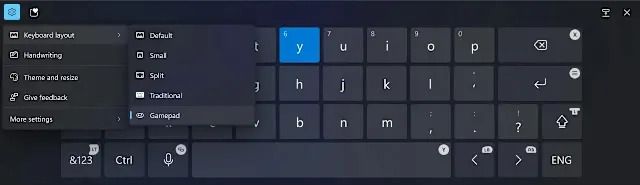
Microsoft has announced a new gamepad keyboard layout for Windows 11, designed to enhance the gaming and navigation experience for users who prefer controllers over traditional keyboards and mice. This update aims to provide smoother and more intuitive controls, especially for those who rely on gamepads for PC gaming and general system interactions.
Key Features of the New Gamepad Keyboard Layout
Ergonomic Design – Optimized button layout for seamless and responsive control using a gamepad.
Windows 11 Navigation Support – Users can browse menus, type text, and launch apps using only their game controller.
Full Compatibility with Major Gamepads – Supports Xbox Wireless Controllers, PlayStation DualSense, and third-party gamepads officially recognized by Windows 11.
Xbox Game Bar Integration – Gamers can record gameplay, adjust audio settings, and access system tools directly via the gamepad.
Smart Typing Mode – Features autocomplete and auto-correct functions to simplify text input with gamepad controls.
Why It Matters
With a growing number of PC gamers using controllers, Microsoft aims to make Windows 11 more gamepad-friendly. This feature will benefit:
✔ Casual and console gamers transitioning to PC.
✔ Gamers who use TV setups and prefer a controller-based experience.
✔ Users with accessibility needs who find keyboards challenging.
By reducing reliance on keyboards for basic system tasks, Windows 11 moves one step closer to a more flexible and immersive gaming environment.
Release Timeline
The new gamepad keyboard layout will be included in Windows 11 Insider Preview next month, with a full rollout expected mid-2025 as part of a major Windows update.
Is this a game-changer for Windows gaming? Share your thoughts!
 SERIUSBAH.COM